Workflow Template Library
Start with a workflow people can picture.
The fastest way to understand Synryzen is to see useful examples: summarize daily notes, prepare smart-home actions, create founder updates, clean up maintenance handoffs, review contracts, audit subscriptions, build JSON, and digest research.
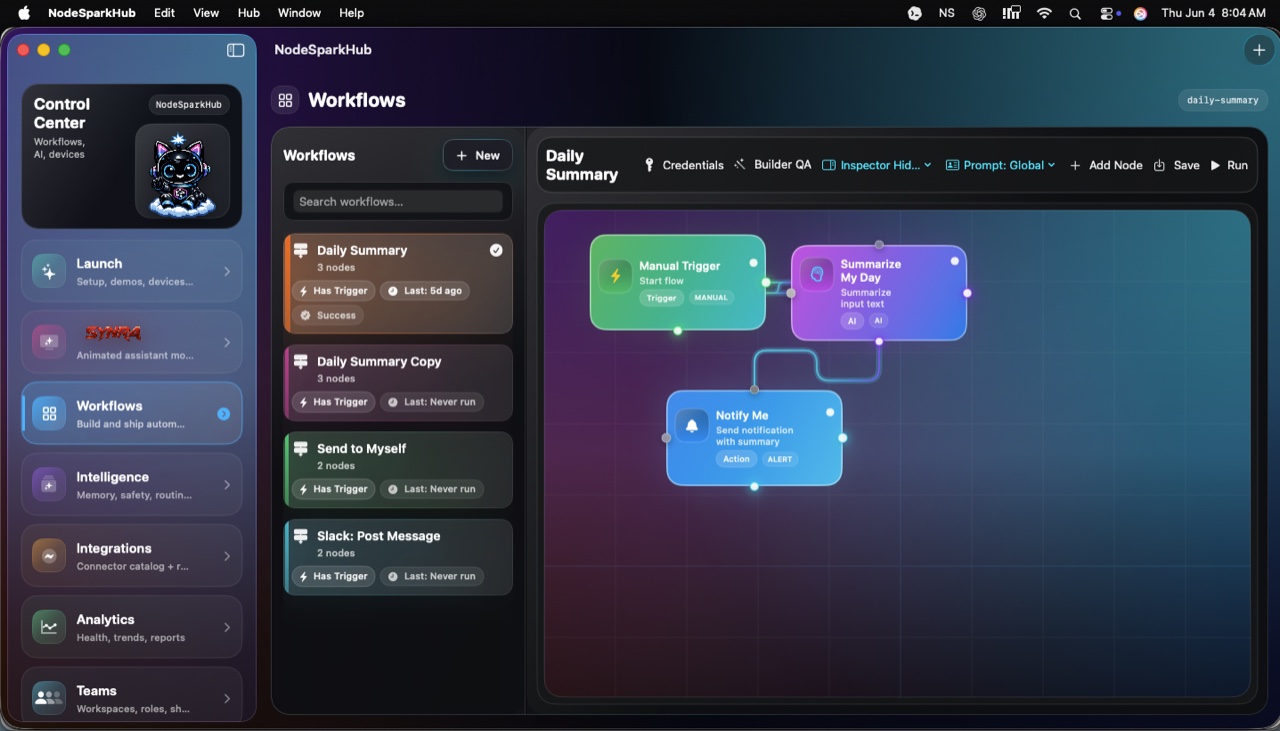
NodeSpark, NodeSparkHub, and Synra work together as the flagship Synryzen automation ecosystem.
Templates
Pick the workflow that sounds like your week.
Solo automation
Daily AI Summary
Paste notes or collect daily input, summarize the important points, and send yourself a clean notification or email.
- Summarize notes faster.
- Create a repeatable daily review habit.
- Use NodeSparkHub later for scheduling and logs.
Smart home
Home Assistant Morning Routine
Prepare a safe morning routine that can review devices or scenes, explain what will happen, and ask for confirmation before control.
- Make smart-home control easier to understand.
- Keep actions behind confirmation.
- Position Synra as the premium Home Assistant companion.
Founders + small teams
Founder Weekly Update
Collect wins, blockers, numbers, and next steps, then create a crisp weekly update for customers, teammates, or investors.
- Ship clearer updates.
- Reduce blank-page writing.
- Build a repeatable operating rhythm.
Maintenance teams
Maintenance Shift Handoff
Turn downtime notes, open actions, and equipment status into a cleaner handoff summary between shifts.
- Reduce lost context.
- Make action ownership visible.
- Spot recurring reliability issues.
Contract review
Contract Review Checklist
Scan or import a contract, summarize the key terms, identify risk areas, and prepare negotiation questions.
- Understand contracts faster.
- Create better questions.
- Keep risk review organized.
Personal finance
Subscription Audit
Find recurring charges, review subscriptions, scan receipts, and decide what to keep, cancel, or investigate.
- Find quiet recurring charges.
- Understand spending patterns.
- Build a cleaner personal finance habit.
Developer productivity
JSON API Payload Builder
Describe or build a clean JSON payload, validate it, format it, and copy it into the tool or API you are working with.
- Avoid syntax errors.
- Build nested structures faster.
- Keep JSON readable and reusable.
Reading + research
Research Reading Digest
Import reading material, summarize the key ideas, extract keywords, and keep notes, bookmarks, and progress organized.
- Understand reading material faster.
- Keep research notes organized.
- Return to important sections without hunting.
How to use these
Templates are marketing examples, not remote execution.
Build in the app
Open the matching Synryzen app, then use the template page as the plain-English setup map.
Use Synra for guidance
Ask Synra to explain the workflow, suggest nodes, or help you choose what should stay manual.
Confirm sensitive actions
Home Assistant and other sensitive automations should remain review-first and confirmation-gated.
Stay in the loop
Get Synryzen product updates.
Join the early update list for NodeSpark, NodeSparkHub, Synra, Home Assistant automation notes, App Store releases, and practical workflow ideas.
Tell me what you care about.
Pick the product area and leave a note if you want help choosing where to start.
FAQ
Common questions
Do these templates run from the website?
No. The website explains what to build. Real workflows are created in NodeSpark, run through NodeSparkHub when needed, or handled by the matching Synryzen app.
Which template should I try first?
Start with Daily AI Summary if you want automation, Home Assistant Morning Routine if you want smart-home control, or Founder Weekly Update if you want a practical business workflow.
Can Synra help explain these templates?
Yes. Synra is positioned as the assistant layer for explaining NodeSpark workflows, preparing automation ideas, and guiding setup alongside NodeSparkHub.